UI discovery
Design
Spider UI is a Single Page Application from where you may configure Spider, browse captured data and perform analysis.
It might seem a bit tight, as it has been designed for professional usage. You have all at hand to see data together, to compare, analyse and decide.
Main parts
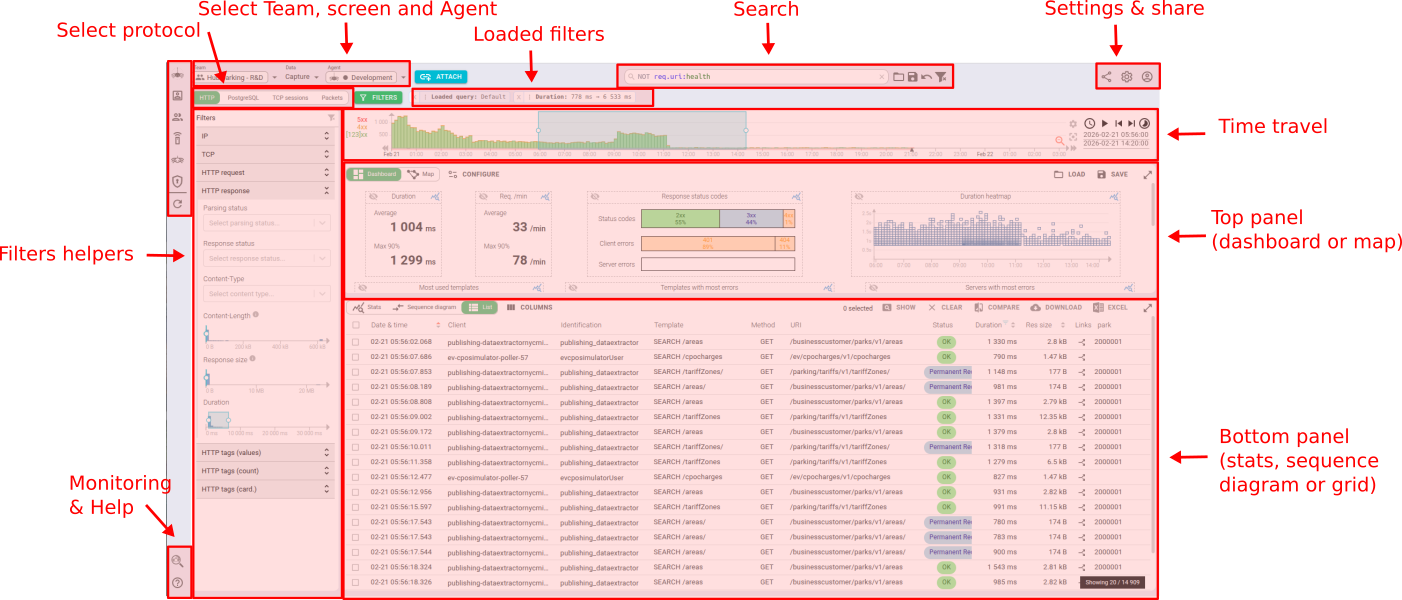
The screen is composed of:
- The top navigation bar — Team/Data/Agent selectors, View tabs, FILTERS toggle, Search bar, action icons
- The filters panel on the left (collapsible, toggled via the FILTERS button)
- Settings and various actions on the top right
- The time travel at the top to select the time period
- The top panel just below, showing summary information about the data of the selected period
- The bottom panel showing more detailed views of the data
- And, when a specific entity is opened, the detail panel opens on the right
Let's discover the navigation bar first.