Service Accounts
At Spider, I am continuously working to enhance our platform to meet the evolving needs of our users and integrate seamlessly into modern development and operations workflows.
I'm excited to announce the release of Service Accounts, a feature designed to provide a secure and programmatic
way for third-party applications and scripts to interact with Spider API using
standard OAuth2 client_credentials flow.
Why Service Accounts?
Spider provides deep visibility into your network communications, capturing packets, TLS secrets, and hostnames to rebuild and analyse interactions within your distributed systems.
While the Web UI offers powerful tools for analysis and debugging, there's often a need for automated access to this data or the ability to trigger actions programmatically.
Previously, integrating external tools or automating tasks might have required using personal user credentials,
which is not ideal for security or auditability.
The Service Accounts feature addresses this by providing dedicated identities for your applications.
The Added Value
Service Accounts bring several key benefits for automating and integrating with Spider:
- Enhanced Security:
- Instead of using personal user accounts, applications can authenticate with their own credentials.
- This isolates access and reduces the security risk associated with shared or compromised user accounts.
- Granular Permissions:
- Service Accounts can be granted specific permissions, limiting their access only to the data and features they need.
- This aligns with the principle of least privilege and improves your overall security posture.
- Improved Auditability:
- Actions performed by a Service Account can be clearly distinguished from actions performed by human users, simplifying auditing and troubleshooting.
- Automation Enablement:
- Service Accounts are the standard way to allow automated processes and scripts to securely interact with APIs.
- This unlocks possibilities for custom reporting, automated checks, integration with CI/CD pipelines, and more.
Design with much reuse
Spider is built using a microservices architecture with an Open API exposing REST APIs. The new Service Accounts feature leverages this existing API infrastructure to provide secure authentication for programmatic access.
Service account design reuses many current user's account features while replacing only some specific parts. As service account could be used in many use cases, reusing the user's account access, permissions and sharing features limit the new feature impacts in the code.
- Service accounts are managed by the same microservice as user's accounts.
- The only specific pieces are the creation API and the connection API.
- Very limited changes have been made to the UI:
- A new button is used to create the account on the UI
- The user's profile details tab is adjusted to manage service accounts.
- The Share tabs components have been adjusted as well.
Using standards
To make it easy for anyone to reuse Spider API, I decided to use well-known standards for third party connection rather than reusing Spider agents way of connecting - with custom signature.
Spider Service Accounts API connection offers OAuth2 client-credentials way for connection.
You may use either:
Basic Auth + application/x-www-form-urlencoded request body
POST /customer/v1/sessions/for/service-account
Authorization: Basic ...
Content-Type: application/x-www-form-urlencoded
Accept: application.json

grant_type=client_credentials
application/x-www-form-urlencoded request body only
POST /customer/v1/sessions/for/service-account
Content-Type: application/x-www-form-urlencoded
Accept: application.json

grant_type=client_credentials
&client_id=...
&client_secret=...
application/json request body
POST /customer/v1/sessions/for/service-account
Content-Type: application/json
Accept: application/json

{
  "grant_type": "client_credentials",
  "client_id": "...",
  "client_secret": "..."
}
Response
The response is in JSON, and contains:
- the JWT to reuse when calling the API,
- its TTL
{
  "access_token": "...",
  "token_type": "Bearer",
  "expires_in": 5400
}
When using wrong credentials, an error is returned.
The account is locked after a few consecutive unsuccessful attempts.
New permissions
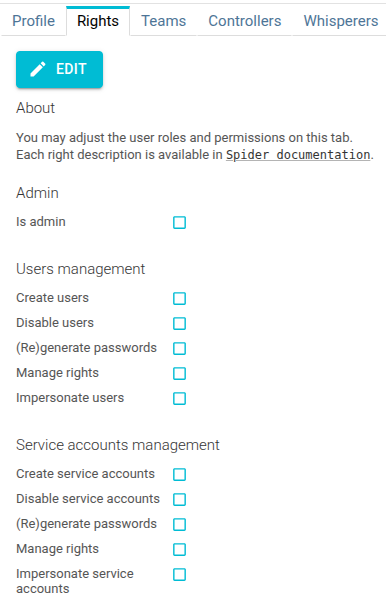
Permissions have been added to manage Service Accounts, similar to those used to manage users:
UI changes
Managing Service Accounts is done directly within the Spider UI.
Users listing
Service accounts are listed after User's accounts in the User list drop down.
They have a nice robot icon 🤩
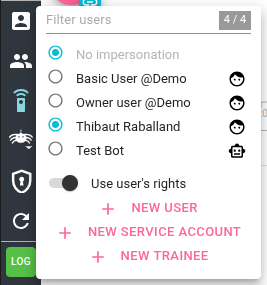
It is possible to see only Service or User Accounts by searching ServiceAccount or Customer in the search input.
Service Account profiles
Service accounts profiles have a specific Profile tab:
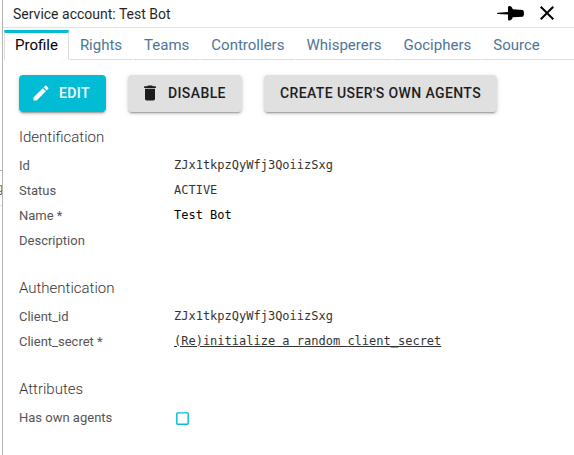
client_id and client_secret are the credentials to be used for connecting.
Client secret is stored encrypted and cannot be retrieved once created. You may set a random secret by clicking on the link, or edit it manually when editing the profile.
Sharing tabs of agents and teams
Team users listing as well as Agents sharing tabs have been updated to accept accounts ids as input on top of user's emails.
Thus, you can now add a service account to a team, or directly share agents with service accounts.
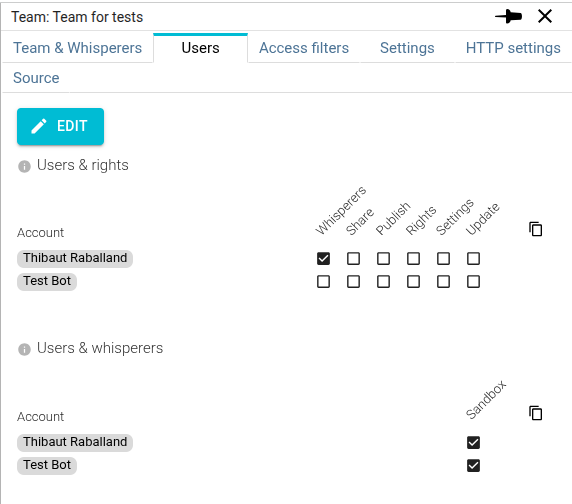
The configuration options allow administrators to precisely control the scope of access granted to each Service Account.
Conclusion
I believe this addition will greatly enhance the flexibility and automation capabilities when working with Spider. Explore the API documentation to see what's possible!
To support this new feature, you will find a new section in the Spider administration documentation dedicated to API integration.