Select a Controller
Cluster network usage is accessed by selecting a Controller.
Controller concept
A Controller is a Spider agent controlling capture agents (Whisperers and Gociphers) spawned in a Kubernetes cluster.
Selecting a Controller allows you to access the network usage of the Cluster, that is:
- Captured by Gociphers, in Linux kernel
- Enriched by Controllers, using Kubernetes API
Select a Controller
To select a Controller,
- Select
Usagein the navigation bar. The agents list switched toControllers. - Select the Controller you want to access data from.
- If you don’t find it (only the first 20 are displayed), you may search by partial name, id…
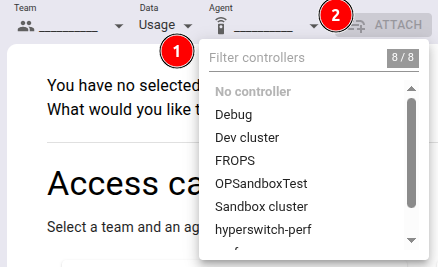
👉 Select a Controller to continue
Once selected
The selected Controller is shown in a badge in the top left of the screen.

The status icon adapts to the selected Controller.
- Connected (above)
- Disconnected (below)
Depending on the view and mode selected, the timeline is refreshed, the cluster map is rendered, the grid lists usages...
Next page lists available Views and Modes of Network Usage.